ads

Affichage des articles dont le libellé est MICROMAX. Afficher tous les articles

samedi 19 septembre 2015

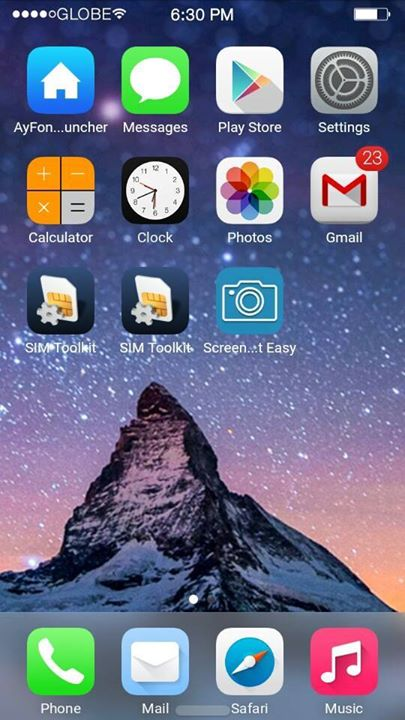
{4.4.2} {ROM} IOS 8 For Micromax Canvas Gold A300


:highfive:IOS 8 ROM 4.4.2 FOR BELOVED Micromax Canvas Gold A300 DEVICES:victory:


** NOTE **
Back up first! I am not responsible if you brick your device or anything happens to your phone.
Read everything first before commenting or asking anything, otherwise, I’ll ignore you.If you have any concerns or you discovered new bugs, please kindly comment it here.:fingers-crossed:


** FEATURES **
- DUAL SIM
- 95% Iphone 5 UI and Framework
- Rooted
- Powered by Viper4AndroidFx
- Built in Xposed
- Built in Gravitybox
- Built in Ayfone Gece Modu
- Smooth Interface
- IOS8 Ringtone and Notification sounds
**KNOW BUGS FIXED **
- SD card can't read (FIXED)
- Camera Flash not working (FIXED)
- Changing Wallpaper FC (FIXED)
- Gravitybox not working (FIXED)
- Internal storage can't read (FIXED)
- Overheating while charging on screen off (FIXED)
THAT’S ALL FIXES I CAN DO (YOU CAN SEARCH FOR OTHER BUG FIXES):laugh:


** Bugs **
- Inaccurate Internal / Storage{Though Storage Working Correctly}
- let me know if there is any,we will give you a patch ASAP...:good:


--*SCREENSHOTS*--


*****CREDITS*****
Devrookie AKA Susmit Agarwal{The Main Porter Of This Rom}
Ankit Verma{Official Tester For This Rom}
Amit Pathak
Manhar{Thanks For Port Rom}
Avinash Kodidasu
Micromax{For Such As Beautiful Device As Canvas Gold}
Google{For Giving Us Faboulous ANDROID}
Mr.Ak{Dont Forget Me Yet}:cyclops:


DONT FORGET TO HIT THE THANKS BUTTON IF YOU ARE DOWNLOADING IT *] :fingers-crossed:

XDA:DevDB Information
[ROM] [4.4.2] IOS 8 ROM FOR MICROMAX CANVAS GOLD{MT6592 DEVICES OCTACORE}, ROM for all devices (see above for details)

Contributors
Mr.Ak, Devrookie, Ankit Verma, A.p,manhar2108,Avinash Kodidasu
Source Code: http://computerplusandroid.blogspot....or-mt6592.html

ROM OS Version: 4.4.x KitKat
ROM Kernel: Linux 3.4.x
ROM Firmware Required: V4 Stock Merged
Based On: Ios8

Version Information
Status: Beta

Created 2015-09-19
Last Updated 2015-09-19


jeudi 17 septembre 2015

Micromax A311


Can anyone pls develop ios rom for micromax a311 mobile, i thing most of them interesting in ios. :angel:


mardi 15 septembre 2015

Custom ROM For Micromax E311 (Cyanogen ROM)


Please Help Me Friends I Want To Flash Custom Cyanogen ROM in Micromax
E311 Please Give Me A Direct Link To Download The ROM. I Found Some Links
On Google But It Showing Survey / Offer Which Are Not Completing Please Give
Direct Link For It Please Please...


Sent from my Micromax E311 using XDA Free mobile app


Root Micromax Canvas Nitro 4G


Hi, I want to know how to root Micromax Canvas Nitro 4G:):)


mardi 8 septembre 2015

micromax a110q is possible for lolipop 5.1.1 update ?


I have micromax a110q .

And i want to update 5.1.1 lolipop in my device.... Any budy can help me for that....pl help me....


usb problem in micromax a110q


suniltelistr@gmail.com

Hello i have micromax a110q mobile. and issue is my mobile is charging but not detecting
as usb mass or usb debugging. i have try all things finally i realized that usb port noyt working
cause i it was repaired by a local repair man. now i want schematic circuit diagram of MMX 110Q or
usb jumper solution for "D-" "D+" for solve this issue.

thank you in advance.


Just guide me on how to install Custom rom on MICROMAX CANVAS 4


Good Dear Techies :)
i have some basic doubts. Please do guide me on the following as i am a no voice in this area on how to flash a custom roms, and refrain using some hard terms and make this process as simple as possible and would appreciate if it is a step by step guide :)
so my queries are as follows.
1. i have successfully rooted my MICROMAX CANVAS 4. Now i want to install a nice and good CUSTOM ROM on it. i want the list of all good and bug free custom roms available for my micromax canvas 4.
2.how to flash a new rom on my device.
3. how to backup the current rom? and how to restore it?
4. were is the path i mean were will i save the backuped original rom on my phone>? ( internal or external memory) please do guide me the path.
5. in the same way were will i backup the downloaded custom rom?
6. after downloading the rom, what are the step y step procedure to install the custom rom?
7. if i dont like the custom rom, what is the procedure to install back my original rom ?
8. just suggest me some good custom rom as i am really weak in knowing one.

Thank you soo much.
Ranjith


dimanche 6 septembre 2015

Micromax A104


Hello XDA Community,

long time not see..., anyway, i just learned how to root, customized my phone with PussyFap2.5 (Custom Rom) to look like the Android Lollipop 5.0.1 Update. And there one little problem starts to begin. I have the exact same phone, you can call it Mircomax A104 or just Canvas Fire 2. My Android Version was 4.4.2 since i got the Phone. The only problem was, that it had NEVER any Android Update. So i just googled a little bid and found this Custom ROM (http://forum.xda-developers.com/andr...ire-2-t3104349).

My Questions
1. When i go to Setting --> Android Version it say's "5.0.1" and on Model Number "Android One", so my question is, is my Version now still the same (4.4.2) or is it really 5.0.1, cause I don't think so (just a Custom ROM). About the Model Number we dont need to talk :laugh: it's still the one and only A104.

2. On the Original ROM, so when i got the phone fresh out of the package, Vanilla Android 4.4.2. It had on Settings --> Keyboard and Input --> an Application where there was 20 Indian Languages. But ufortunately I dont know it's name or anything about it. I want only this App and no other like Swiftkey, or a cheap App on the PlayStore, because this Keyboard was so good.

Sincerely
Los Kirat


custom rom for micromax android canvas a1


I am a newbie in this field. So the progress till now is that i have managed to root my Micromax Canvas A1. Thats all of it. so now i want to install a custom ROM, and would love some help, how should i proceed please help. I m running 5.1.1 on my cell, and it came with 4.4.4.
-thanx


Colour Os For Micromax Canvas Gold A300


COLOUR OS ROM FOR CANVAS GOLD A300

How To Flash
Make sure you are of v4 t26 (merged storage), to be on a safer side backup your imei from mobile uncle tool you can install it from play store and keep your imei safe in your pc or somewhere else.
1) Download Colour rom from this link
2) Put to Internal storage
3) Go to TWRP/PHILZ recovery(PHILZ link given below for TWRP download from needrom)
4) In PHILZ click on format the format to install new rom or for twrp wipe data/factory reset and wipe partition
5) Select Install From Internal_SDCard, Then Select File And Click YES

Bugs:
no bugs (till date if any please comment) :p

NOTE:
I Will Not Be Responsible For Any Bricked Devices or Any Problem So Flash At Your Own Risk.

Credits:
A.P and of course me YK :p

Last but not least HIT Thanks if i helped you ! Hitting thanks doesn't cost you but encourages me to work more !


samedi 5 septembre 2015

i have chipset MT6589M mobile named micromax a082 bolt, help me find a ROM!!


i had trouble finding/searching a decent ROM with chipset MT6589M :(
i had searched to port from any other mobile ROM with same chipset, but i m not sure to take that risk.
plzz guide me to take this risk. OR plzz upload a ROM for micromax bolt A082. :( :(


vendredi 4 septembre 2015

MIUI7 v5.8.27 for micromax A106


---Your warranty is now void---
I am not responsible for bricked devices, dead SD cards, thermonuclear war, or you getting fired because the alarm app failed. Please do some research if you have any concerns about features included in this ROM before flashing it! YOU are choosing to make these modifications, and if you point the finger at me for messing up your device, I will laugh at you.
Also Join Our FB group for More ROMS,Regular Updates,Patches,Mods..etc..
https://www.facebook.com/groups/u2official/


Features
1.SIM 2 3G WORKING. NOW ITS DUAL 3G - FIRST FOR MT6582
[Credits to Mr.deliopoulos-for making it & Mr.Ondipuli-for informing us about that patch]
2. Beautiful MIUI 7 - GLOBAL
[Credits to MIUI Team & Team ARGN for porting]
3. Online themes,wallpapers,ringtones,etc..
4. More Battery Efficient
5. Smooth
6. Modded dialer , settings , In Call UI and new File manager
7. Good Camera Quality
8. All Unwanted/chinese MIUI apps Removed
9. Play Store working
10. Super Compressed to 392MB
11. Modded launcher - No more icon overlapping [credits-Lưu Thế Đậuu
12. Based on 5.8.27 [4.4.2 based]
13. Multi language
14. Dirac HD working

*****And Much More*****

Screnshots


UI limitations/Issues
1.DPI issue is not fully fixed in stable too, so some themes will not work properly
Default dpi we put is 213 , you can change it from build.prop file
2.Both SD card and phone storage mounted in PC as MTP - if you want to mount as usb storage use the provided app-Xperia SD Card mount
3.Font size change option not working with 5.8.13
use Ifont app to change font size
4.Due to themes and other effects , ram use is little high , but smooth also good battery backup too


---Installation instructions---

You must have CTR Twrp Or Philz custom recovery.
use this CTR,
First take a full ctr backup in case you want to restore your old ROM
Reboot to ctr
wipe menu-> fomate system, wipe data option
Install ROM zip from sd card
Reboot


Download Link https://drive.google.com/file/d/0B7J...p=docslist_api

supersu https://download.chainfire.eu/396/supersu/


PORTED BY Me (Vijay)
Akhilesh (http://forum.xda-developers.com/member.php?u=5648292)
Raju Sinha (http://forum.xda-developers.com/member.php?u=6038420)
Geo Baby
NJ ROCKS (http://forum.xda-developers.com/member.php?u=6025279)
Thanks to John Kanti Deb and Sardar Ji
for testing the rom and pointing out bugs.
Also Join Our FB group for More ROMS,Regular Updates,Patches,Mods..etc..
https://www.facebook.com/groups/u2official/


-----------------------------------------------------------------------------------------------------
Some info about the rom
Downloading Apps from playstore using mobile data
For downloading apps from playstore through mobile data you need to set data download limit to unlimited , otherwise it'll always shows "Waiting for WiFi"

So here's how to set it to unlimited
1.From tools folder ,open downloads
2.from its settings change size limit to unlimited
Now you can download anything fom playstore using your mobile data

Follow the below screenshots for easy understanding

Attached Thumbnails
Click image for larger version Name: Screenshot_2015-07-10-00-46-00.png Views: 364 Size: 224.6 KB ID: 3397811 Click image for larger version Name: Screenshot_2015-07-10-00-46-05.png Views: 406 Size: 36.0 KB ID: 3397812 Click image for larger version Name: Screenshot_2015-07-10-00-46-09.png Views: 388 Size: 28.2 KB ID: 3397813 Click image for larger version Name: Screenshot_2015-07-10-00-46-12.png Views: 350 Size: 45.8 KB ID: 3397814
1.Theme manager apk is chinese one (for both paid and free themes-Only in Chinese beta)
2. For getting paid themes free-
Root the ROM. Open wsm tools.install it , enable all modules. Reboot
Now you don't need mi account. You can download any themes,fonts .
Some themes have DPI issue, just jump to another theme. That's all
3.If you face low call volume , use MTK engineer mode (from mobile uncle tools) to increase the volume (only try if your call volume is really Low)
Engineer Mode->Hardware Testing->Audio
From Audio ->Normal Mode
You'll see "Sip"
increase "Max Vol" and "Value is" to 150 ( you can increase it upto 160)
do same with Mic,Sph,Sph2,Sid and Media
After changing values don't forget to press the set button every time.
After increasing these 6,your call volume will definitely increase
(if you face high volume , reduce all values to some other like 140 or other)
Flash Dolby ATMOS too. It also helps to increase call volume.
http://forum.xda-developers.com/devd...t/dl/?id=12537
4.some themes may cause com.android.media force close error or non readable toast(ussd code replies) due to dpi issues . change to other themes. lots of good themes without any issues are present in theme store .try them.
5.Open camera app and change picture quality from standard to high for high quality.
6.If you didn't get Whatsapp/fb message popups
Open security and give Whatsapp/fb all permission and make it auto start.
Attached Thumbnails
Click image for larger version Name: Screenshot_2015-07-26-20-29-04.png Views: 298 Size: 70.1 KB ID: 3419221 Click image for larger version Name: Screenshot_2015-07-26-20-29-19.png Views: 298 Size: 147.1 KB ID: 3419222


Enabling 3G on SIM 2
1.Open the provided Dual sim control app and go to Data Connection tab
2.Press on "Set SIM 2 as 3G"
it'll now set your SIM 2 in "WCDMA Preferred" mode .Enjoy 3G on SIM 2.
If you want to set as "WCDMA Only" mode ,follow step 3,4&5

3.go to settings/about phone and tap 4 or 5 times on Internal Memory , it'll lead you to testing mode
4.From Testing , press Phone information2
5.You'll see "WCDMA Preferred" press it and change it to "WCDMA Only"

That's all

Enjoy 3G on SIM 2 and press thanks to US

some screenshots are provided below

Attached Thumbnails
Click image for larger version Name: sim2.png Views: 1072 Size: 136.9 KB ID: 3395742 Click image for larger version Name: 11 3g 2.jpg Views: 1000 Size: 24.6 KB ID: 3395745Click image for larger version Name: sim222.png Views: 1000 Size: 106.5 KB ID: 3395744Click image for larger version Name: sim22.png Views: 1050 Size: 42.3 KB ID: 3395743


jeudi 3 septembre 2015

Latest MIUI 7 Global 5.8.22 for Micromax Canavs Knight A350


MIUI 7

Version No.- 5.8.22

BLAZING FAST PERFORMANCE

A ROM by rsbaviskar for Micromax Canvas Knight.
All Rights Reserved.All other trademarks are property of their respective owners.


Features :

-Based on Android 4.4.2
-Ported from Redmi NOTE 3G Global ( Beta Version )
-Pure MIUI
-Es Explorer
-SD maid
-Titanium Backup
-GAPPS included
-Immersive status bar
-Kingroot
-Antivirus
-System & Memory Cleaner
-Record FM and Calls
-Privacy Management
-Power Management
-Data Saver Feature
-Block unwanted calls and messages
-Burst and HDR Modes in Camera
-One Handed Mode
-Guest Mode

-GOD OF CUSTOMIZATION :angel:

-New MIUI 7 Themes
-Redesigned App Icons
-New Settings Arrangement
-Better Toggle Style
-Notification Blocking in Notification Shade
-Improved System Performance


Read FAQ :

Please don't ask noobish questions, first read the FAQ


BUGS :

-Offline charging Animation is distorted but NO issue in device charging otherwise BUGLESS ROM


Installation Instructions :


Code:


-Download ROM & additional links provided in the description and store on Internal or OTG
-Start Recovery Mode. ( Use only PhilzTouch Recovery provided in the given link below )
-Take full backup in recovery mode.(In case of any problem)
-Wipe data or factory reset.
-Wipe cache partition.
-Wipe Dalvik Cache
-Install ROM
-while exiting from recovery allow root access to the device(look FAQ No.1)
-do set up your device on 1st boot.
-Go philz recovery then flash Dolby Atmos  followed by MIUI 7 Sound Patch, it will reboot ur device automatically


Credits :

worstenbrood - For his for Dolby Atmos.

XIAOMI & MIUI -For Providing the ROM.


DON'T FLASH ANY KERNEL


Note :

-IMPORTANT: FLASH AT YOUR OWN RISK. We are not responsible for any bricked phones or damages caused due to the ROM. You lose
warranty when you root/flash ROMS on your phone.

-BATTERY: Keeping at 100% charged is recommended before flashing.

-BACKUP: Take BACKUP from recovery, useful in case you mess up. Or try Titanium to backup all data and apps.

-Please do not mirror without permission.

-Do not port without permission

-Please read the FAQ first as it might help you.

-Please don't send PM. Ask queries in the thread only.

-Please do not send request to add any app / themes.

-This ROM will be kept as as close to pure MIUI to give a rich experience.

-Please don't ask for when will you update the ROM.

-I won't guarantee anything about my ROM. If you like it keep it otherwise the most simple thing you can do is switch to some other ROM.


Download ROM : Click Me

Download Sound Enhancement Patch : Click Me

Download Philz Touch 6.47.7 KK Micromax A350 : Click Me

Download Dolby Atmos V6.5 : Click Me

Hit thanks if you like my work :good:

FAQ :

Q1.How to enable ROOT ?
Ans. while exiting from Philz recovery after successful flashing of MIUI 7 Global ROM,recovery by default ask to give root permission,click apply then reboot system,after setting up u device first u need to open Kingroot app & give root access....for that you will need to be connected to mobile data/wifi connection.

Q3. Xposed does not works on the ROM.
Ans. MIUI does not supports Xposed instead of that you can use WSM Tools.
By using WSM Tools you can use the Xposed modules which are supported by WSM Tools.


Q4. Unable to download apps from the Play Store and large files when using mobile data ?
Ans.First open the tools folder on home screen, then go to the download app, go into its settings.
Change the download limit to unlimited . Now try downloading apps from the play store it should work and also you will be able to download large files.

Q5. How to move apps to Internal Storage ?
Ans. Moving apps to Internal storage does not works on MIUI.

Q6. How to Turn ON flash light from Lock Screen ?
Ans.The lock screen on the MIUI V7 had a few extra functions than the standard unlocking and shortcuts. One of them is turning flashlight On directly from the lock screen. For that, while the screen is active but locked, you just need to long press the home button and the torch / flashlight turns on. It would not turn off until you prompt it although the screen would go blank in a few seconds.

Q7.How to Change the look of Multitasking / Recent Menu ?
Ans.By default, when you press the Recent key (the left bottom one), the recent apps show up, and it is just the App icon that is seen. But, you can make it look like the iOS multitasking screen where large thumbnails are shown, with the preview of what is going on in the app. You can change that by pinching out on the empty area in the multitasking screen. Pinching in / out is what changes the look, basically.

Q8.How to Enable or Change Notification Light Color ?
Ans.There is an option that allows you to change the change the notification light as well as turn it off completely. To do that you have to go to Additional Settings section, and tap on notification light. There you would find four option, first would allow you to switch ON or OFF the Pulse Notification light while other options allow you to change colors for notifications, calls, as well as messages. You can choose only 2 colors ( GREEN OR RED ), which will appear in the LED present just below the home button.

Q9.Facebook Messenger pop-up head does not appears , what to do ?
Ans.Go to Security icon on the homscreen > Permissions > Again Permissions > Open Messenger > Enable Display pop-up window.
You can follow the same method for other apps as well which have the feature of pop-up head notification.

Q10.My Screen Orientation takes longer time than usual ?
Ans.Open Advance Tools app which is inbult in MIUI 7 Global Rom, go to sensors ,you will find total 9 sensors with info, keep you device on horizontal & Steady surface & press reset button by selecting individual sensors...

XDA:DevDB Information
MIUI 7 Global Edition for Micromax A350, ROM for all devices (see above for details)

Contributors
rsbaviskar, rohanbaviskar530
ROM OS Version: 4.4.x KitKat
ROM Kernel: Linux 3.4.x
ROM Firmware Required: 4.4.2-V2

Version Information
Status: Stable
Current Stable Version: 5.8.22
Stable Release Date: 2015-08-29
Current Beta Version: 5.8.22
Beta Release Date: 2015-09-02

Created 2015-09-04
Last Updated 2015-09-03


Cant be make backup of Micromax canvas gold A300 through Mtk droid tool


IHi
I have successfully done rooting of device Micromax canvas gold A300 through sp flash tool by flashing cwm recovery by using scatterfile file was present in firmware later I tried to backup my rom through mtk droid tools, I have got an error ie'
ERROR : system it was not remounted on ReadWrite!

ERROR : file adbd not install !

This occurring SuperSU permission granted in my phone...
Please help me to backup my rom...
I using Windows 7
Installed drivers are Android sdktool, mobistel cynus t1 , universal USB drivers,and USB drver Micromax canvas gold A300
My software version is T22
And help me to install Android sdktool correctly for this actions:crying::cyclops:


Latest MIUI 7 Global 5.8.22 for Micromax Canavs Knight & similar devices


Version No.- 5.8.22

A ROM by rsbaviskar for Micromax Canvas Knight.
All Rights Reserved.All other trademarks are property of their respective owners.


Features :

-Based on Android 4.4.2
-Ported from Redmi NOTE 3G Global ( Beta Version )
-Pure MIUI
-Es Explorer
-SD maid
-Titanium Backup
-GAPPS included
-Immersive status bar
-Antivirus
-System & Memory Cleaner
-Record FM and Calls
-Privacy Management
-Power Management
-Data Saver Feature
-Block unwanted calls and messages
-Burst and HDR Modes in Camera
-One Handed Mode
-Guest Mode

-GOD OF CUSTOMIZATION :angel:

-New MIUI 7 Themes
-Redesigned App Icons
-New Settings Arrangement
-Better Toggle Style
-Notification Blocking in Notification Shade
-Improved System Performance


Read FAQ :

Please don't ask noobish questions, first read the FAQ


BUGS :

-Offline charging Animation is distorted but NO issue in device charging.


Installation Instructions :


Code:


-Download ROM and store on Internal or OTG
-Start Recovery Mode. ( Use only PhilzTouch Recovery provided in the given link below )
-Take full backup in recovery mode.(In case of any problem)
-Wipe data or factory reset.
-Wipe cache partition.
-Wipe Dalvik Cache
-Format System
-Install ROM


Credits :

worstenbrood - For his for Dolby Atmos.

XIAOMI & MIUI -For Providing the ROM.


DON'T FLASH ANY KERNEL


Note :

-IMPORTANT: FLASH AT YOUR OWN RISK. We are not responsible for any bricked phones or damages caused due to the ROM. You lose
warranty when you root/flash ROMS on your phone.

-BATTERY: Keeping at 100% charged is recommended before flashing.

-BACKUP: Take BACKUP from recovery, useful in case you mess up. Or try Titanium to backup all data and apps.

-Please do not mirror without permission.

-Do not port without permission

-Please read the FAQ first as it might help you.

-Please don't send PM. Ask queries in the thread only.

-Please do not send request to add any app / themes.

-This ROM will be kept as as close to pure MIUI to give a rich experience.

-Please don't ask for when will you update the ROM.

-I won't guarantee anything about my ROM. If you like it keep it otherwise the most simple thing you can do is switch to some other ROM.


Screenshots : Click Me

Download ROM : Click Me

Download Sound Enhancement Patch : Click Me

Download Philz Touch 6.47.7 KK Micromax A350 : Click Me

Download Dolby Atmos V6.5 : Click Me

Hit thanks if you like my work :good:


XDA:DevDB Information
MIUI 7, ROM for the Micromax A350

Contributors
rsbaviskar XIAOMI, MIUI
ROM OS Version: 4.4.x KitKat
ROM Kernel: Linux 3.4.x
Based On: MIUI

Version Information
Status: Beta

XDA:DevDB Information
MIUI 7 Global Edition For Micromax A350, ROM for all devices (see above for details)

Contributors
rsbaviskar, rsbaviskar, rohanbaviskar530
Source Code: http://bigota.d.miui.com/5.8.22/miui...94c042_4.4.zip

ROM OS Version: 4.4.x KitKat
ROM Kernel: Linux 3.4.x
ROM Firmware Required: 4.4.2-V2
Based On: MIUI

Version Information
Status: Beta
Current Stable Version: 5.8.22
Stable Release Date: 2015-09-02
Current Beta Version: 5.8.22

Created 2015-09-03
Last Updated 2015-09-03


mardi 1 septembre 2015

Micromax Canvas Nitro Develoment


Helllo everyone

I have sucessfully rooted my Micromax canvas A311 using kingroot app
then i installed TWRP recovery
then i also installed Xposed n other modules to customize my phone .:)


lundi 31 août 2015

STOCK_UI_REBORN_V1 (196mb only) For Micromax Unite-2(kitkat)


This is stock rom( kitkat.) of Micromax Unite-2
I have deodexed this rom fully.
reduced its size to 196mb.
have themed it lightly with white background in settings .
very smooth rom with good battery backup.


Flashing procedure:-
Download Rom zip and SuperSu zip from given links below.
put both zips on external sd card.
restart in custom recovery :
wipe data factory reset.
wipe clear cache.
advance-wipe dalvik cache.
choose zip from SD card :
select rom zip.
also after rom flashing complete ,select SuperSU zip and flash it.

links-
ROM LINK-https://drive.google.com/file/d/0B5bbPmY0Z0AHQ3JQUlN0MmxEVWc/view?usp=sharing
SuperSu LINK-https://drive.google.com/file/d/0B5bbPmY0Z0AHQlFmOWVfNEw4eUE/view?usp=sharing


screenshots attached below.


Attached Thumbnails


Click image for larger version<br/><br/>Name:	10985497_553347094817966_1461081349559659506_n.jpg<br/>Views:	N/A<br/>Size:	27.8 KB<br/>ID:	3457674
 

Click image for larger version<br/><br/>Name:	10999892_553347078151301_3886050049352909203_n.jpg<br/>Views:	N/A<br/>Size:	32.2 KB<br/>ID:	3457675
 

Click image for larger version<br/><br/>Name:	11052011_553347194817956_8788772537904283309_n.jpg<br/>Views:	N/A<br/>Size:	24.5 KB<br/>ID:	3457676
 

Click image for larger version<br/><br/>Name:	11137092_553347544817921_6916374065993374237_n.jpg<br/>Views:	N/A<br/>Size:	22.7 KB<br/>ID:	3457677
 

Click image for larger version<br/><br/>Name:	11225261_553346981484644_3593456032001599230_n (1).jpg<br/>Views:	N/A<br/>Size:	17.9 KB<br/>ID:	3457679
 

Click image for larger version<br/><br/>Name:	11866397_553347284817947_6868573638023633722_n.jpg<br/>Views:	N/A<br/>Size:	21.8 KB<br/>ID:	3457680
 

Click image for larger version<br/><br/>Name:	11866439_553347181484624_3440319438798839744_n.jpg<br/>Views:	N/A<br/>Size:	30.7 KB<br/>ID:	3457681
 

Click image for larger version<br/><br/>Name:	11870662_553347218151287_8575181724680078184_n.jpg<br/>Views:	N/A<br/>Size:	14.9 KB<br/>ID:	3457682
 

Click image for larger version<br/><br/>Name:	11870710_553347318151277_4296245320249667151_n.jpg<br/>Views:	N/A<br/>Size:	16.4 KB<br/>ID:	3457683
 

Click image for larger version<br/><br/>Name:	11880573_553347371484605_8228903648778172339_n.jpg<br/>Views:	N/A<br/>Size:	29.8 KB<br/>ID:	3457684
 

Click image for larger version<br/><br/>Name:	11880679_553347464817929_84682218409812308_n.jpg<br/>Views:	N/A<br/>Size:	18.9 KB<br/>ID:	3457685
 

Click image for larger version<br/><br/>Name:	11888111_553347384817937_5155736143737290099_n.jpg<br/>Views:	N/A<br/>Size:	25.6 KB<br/>ID:	3457686
 

Click image for larger version<br/><br/>Name:	11889467_553347068151302_8451780568127338824_n.jpg<br/>Views:	N/A<br/>Size:	15.3 KB<br/>ID:	3457688
 

Click image for larger version<br/><br/>Name:	11889467_553347261484616_1317049316152100659_n.jpg<br/>Views:	N/A<br/>Size:	28.0 KB<br/>ID:	3457689
 

Click image for larger version<br/><br/>Name:	11889524_553347111484631_4625031404657395466_n.jpg<br/>Views:	N/A<br/>Size:	18.8 KB<br/>ID:	3457690
 

Click image for larger version<br/><br/>Name:	11889692_553347418151267_8989277700180646011_n.jpg<br/>Views:	N/A<br/>Size:	31.4 KB<br/>ID:	3457691
 

Click image for larger version<br/><br/>Name:	11891011_553347484817927_4202325135269975844_n.jpg<br/>Views:	N/A<br/>Size:	19.5 KB<br/>ID:	3457693
 

Click image for larger version<br/><br/>Name:	11898674_553347158151293_2900704740585931341_n.jpg<br/>Views:	N/A<br/>Size:	26.4 KB<br/>ID:	3457694
 

Click image for larger version<br/><br/>Name:	11899876_553347348151274_1271608682235929018_n.jpg<br/>Views:	N/A<br/>Size:	29.8 KB<br/>ID:	3457695
 

Click image for larger version<br/><br/>Name:	11900086_553347564817919_8621394826732831350_n.jpg<br/>Views:	N/A<br/>Size:	27.2 KB<br/>ID:	3457696


Factory data reset of Micromax a104 afer rooting.


I am unable to reset my micromax a104 (kitkat) after rooting.
I have already tried three hardware buttons method and going
to <setting>-<backup&restore>-<factory data reset> but it is not working after rooting.
plzzzzz help...
.
.
.
would be so much thankful..............


dimanche 30 août 2015

Pls hlep micromax s300 bolt root and unroot


DEAR ALL...

IAM USING MICROMAX BOLT S300......kindly PLS HELP ME TO ROOT AND UNROOT ...pls help me to solve my questions.

Thank You.


MICROMAX CANVAS NITRO A311 STOCK ROM


MICROMAX CANVAS NITRO A311 STOCK ROM


* Your warranty is now void.
*
* I am not responsible for bricked devices, dead SD cards,
* thermonuclear war, or you getting fired because the alarm app failed. Please
* do some research if you have any concerns about features included in this ROM
* before flashing it! YOU are choosing to make these modifications, and if
* you point the finger at me for messing up your device, I will laugh at you.
*
* Submitting bug reports on nightly builds is the leading
* cause of male impotence.
*/[/CODE]


Instructions:.

Go to recovery mode
select Wipe
wipe dalvik cache
wipe system
wipe data

then go back to main menu
select install
select use external sd card
select rom
and reboot
and ENJOY


Download link
uploading


NOTE:
I have used aroma installer from Hive UI team's installer therefore it will ask you to install a few apps
do not install them just simply install the rom

also in the end it may say that setting perm failed
but do not worry that has no effects on rom or installation


XDA:DevDB Information
MICROMAX CANVAS NITRO A311 STOCK ROM, ROM for the Micromax Canvas Nitro A310/A311

Contributors
yogesh.kalyana
ROM OS Version: 4.4.x KitKat

Version Information
Status: Stable

Created 2015-08-31
Last Updated 2015-08-30